Single-Element Data Group
Single-element data groups enable you to read from and write to a single user-specified parameter, point, item, or register (or coil), depending on remote device type. Sometimes such data groups are identified in a device template file using the attribute dgCat and other times using the attribute dgProtocol. You can use a single-element data group on an ad hoc basis from a data group editor or you can set up a UIS command that uses a single-element data group.
See RecParmName SendParmName Elements for an example.
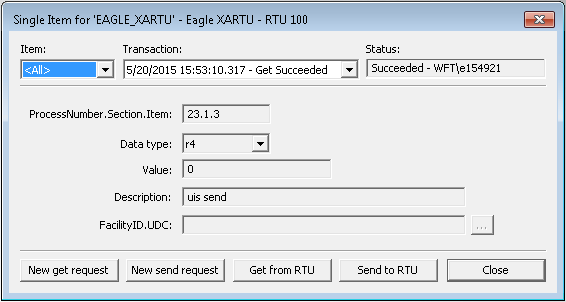
The drop-down box in the upper-left of the data group editor is a filter; it narrows your Transaction data based on the item selected. Select ALL to populate the Transaction list with transactions for all data items with which you have previously communicated from this data group. Select a single item to populate the Transaction list with transactions for only that item. Data and settings displayed in the dialog box reflect the selected transaction. The Transaction list only displays transactions up to the maximum number configured for the data group. FacilityID.UDC provides a means to specify a UDC to which to map the specified data point; it requires a corresponding point in the Point Service (PNT).
The following image is an example of a single-element data group dialog box for the Eagle EIE:
|
Single Element Data Group Dialog Box |